Bonus: Noise Terrain
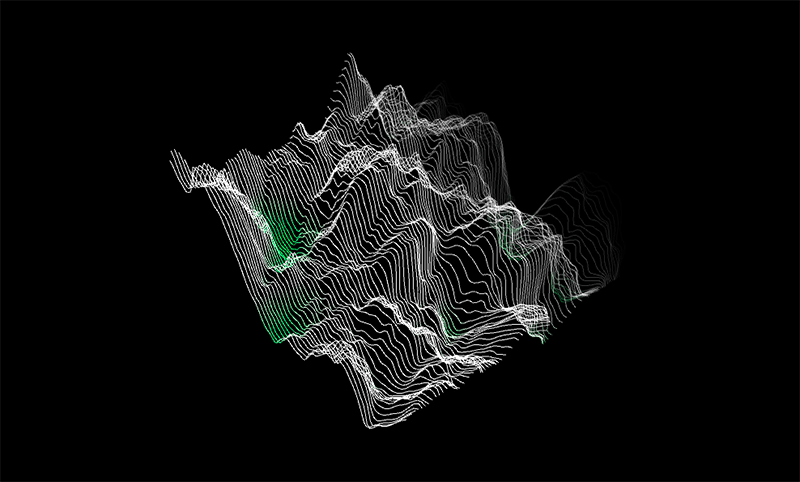
Because Noise is frequently used for 3D displacement (eg Terrain generation,...) we can quickly have a glimpse of how Perlin noise might look in a 3D application.
We draw a simple grid of lines and use the noise value as the height. To make the control of the 3D camera easy wie use the PeasyCam library.
You can install a library with the Contribution Manager via the Processing menu: Sketch > Import Library > Add Library
Then search for "PeasyCam" and hit install. To use it write "import peasy.*" in your sketch. Done!
I use the OpenGL wrapper class beginShape() to draw the lines. This requires the use of the P3D renderer that I can define in the size() method - eg. size(800,800,P3D).
import peasy.*;

float noiseX = 0.0;
float noiseY = 0.0;
float step = 0.05;
float yOffset = 0.0;
int gridSize = 10;
int res=100;
PeasyCam cam;

void setup()
{
  size(1200, 800, P3D);
  strokeWeight(1);
    cam = new PeasyCam(this,1000);
    noiseDetail(4);
}

void draw()
{
  background(0);

  noiseX = 0.0;
  noiseY = yOffset;

  translate(-res*gridSize/2, -res*gridSize/2, 0);

  for (int y = 0; y < res; y++)
    {
     noFill();
     beginShape();
     for (int x = 0; x < res; x++)
       {
        float z = noise(noiseX, noiseY) * 800.0;
        float alpha = map(y, 0, 60, 0, 255);
        stroke(z,255,z, alpha);
        vertex(x*gridSize, y*gridSize, z);
        noiseX = noiseX + step;
       }
    noiseX = 0.0;
    noiseY = noiseY + step;
    endShape();
   }

   yOffset += step/6.0;
}